Requirements, DFDs, design principles and testing — organized as exam-ready answers.
18 × 2 Marks5 × 5 MarksSEC
Part One
2 Marks Questions
Short, precise answers — one clear definition or list per question.
01
2 Marks Question
What is meant by Unambiguity in an SRS?
Unambiguity means that every requirement in an SRS should have only one clear meaning. It should be written in simple and clear language so that everyone understands it in the same way.
Example
❌ "The system should load quickly." — unclear. ✅ "The system should display the page within 3 seconds." — clear and unambiguous.
02
2 Marks Question
What is an External Entity in a DFD?
An External Entity is a person, organization, or another system that sends data to the system or receives data from the system. It is usually represented by a rectangle.
Examples
Student, Customer, Bank, Administrator, Supplier.
ExampleA Student sends registration details to a College Management System.
03
2 Marks Question
Define SRS. Explain Any Four Characteristics of a Good SRS.
SRS (Software Requirements Specification) is a document that describes all the requirements of a software system, including what the system should do and the features and functions it should provide. It acts as an agreement between the client and development team.
Correct
Requirements should correctly represent the needs of the client and users.
Unambiguous
Every requirement should have only one clear meaning so everyone understands it in the same way.
Complete
The SRS should contain all necessary requirements and functions, with no important requirement missing.
Consistent
Requirements should not conflict with each other and should describe the system consistently.
04
2 Marks Question
What is a DFD? Explain its Four Main Components.
A Data Flow Diagram (DFD) is a graphical representation of how data moves through a system. It shows where data comes from, how it is processed, where it is stored, and where the processed data goes.
External Entity
A person, organization, or another system that sends data to or receives data from the system. Example: Student, Customer, Administrator.
Process
An activity that transforms input data into output data. Example: Validate Login, Process Order.
Data Store
A place where data is stored for later use. Example: Student Database, Customer File.
Data Flow
Represents the movement of data from one component to another. It is shown using an arrow (→).
05
2 Marks Question
What is Fact-Finding? Name Any Four Fact-Finding Techniques.
Fact-finding is the process of collecting information about the existing system, its working methods, user requirements, and problems. It helps the system analyst understand the current system and identify improvements required in the new system.
Interviews
Direct conversation with users, managers, employees, or clients to understand the system and their requirements.
On-Site Observation
Observing users while they perform their daily work to understand the actual workflow and problems.
Document and Artifact Review
Examining existing documents such as forms, registers, invoices, reports, and spreadsheets.
Questionnaires and Surveys
Using a set of questions to collect information and feedback from a large number of users.
06
2 Marks Question
Differentiate Between PSPEC and Data Dictionary (DD).
Basis
PSPEC
Data Dictionary (DD)
Meaning
Describes how a particular process works.
Defines and describes the data used in the system.
Defines data elements and their meaning/structure.
Example
Describing the logic for Validate Login.
Defining the structure of Student Details.
In ShortPSPEC = Process Logic, while DD = Data Definition.
07
2 Marks Question
Name the Four Elements of an Analysis Model.
Scenario-Based Elements
Describe how users interact with the system.
Class-Based Elements
Describe objects/classes and their relationships.
Behavioral Elements
Describe how the system behaves in response to events.
Flow-Oriented Elements
Describe how data moves through the system.
In ShortScenario → Class → Behavioral → Flow-Oriented elements.
08
2 Marks Question
What is Abstraction in Software Design?
Abstraction means focusing only on important information and ignoring unnecessary details.
ExampleIn an ATM, the user sees options such as inserting a card, entering a PIN, selecting an amount, and withdrawing money. The user does not need to know how the bank's internal database processes the transaction.
09
2 Marks Question
What is Integration Testing?
Integration Testing is the process of testing whether two or more software modules work correctly together.
ExampleTesting whether the Student Registration module correctly communicates with the Database, or whether a Shopping Cart correctly sends the order amount to the Payment module.
10
2 Marks Question
Define Cohesion and Coupling. Why are High Cohesion and Low Coupling Desirable?
Cohesion
How strongly the tasks inside a module are related to each other. High cohesion is desirable because a module has a clear and focused responsibility.
Coupling
How much one module depends on another module. Low coupling is desirable because it reduces unnecessary dependencies between modules.
ThereforeHigh Cohesion + Low Coupling = Good Software Design.
11
2 Marks Question
What is a Test Case? Write Suitable Test Cases for a Valid Login and an Invalid Password.
A test case is a written set of inputs, steps/actions, and expected results used to check whether a software feature works correctly.
Test Case
Input / Action
Expected Result
TC01 – Valid Login
Enter correct username and correct password.
User should log in successfully and be redirected to the dashboard/home page.
TC02 – Invalid Password
Enter correct username but incorrect password.
System should display an appropriate error message and should not allow the user to log in.
12
2 Marks Question
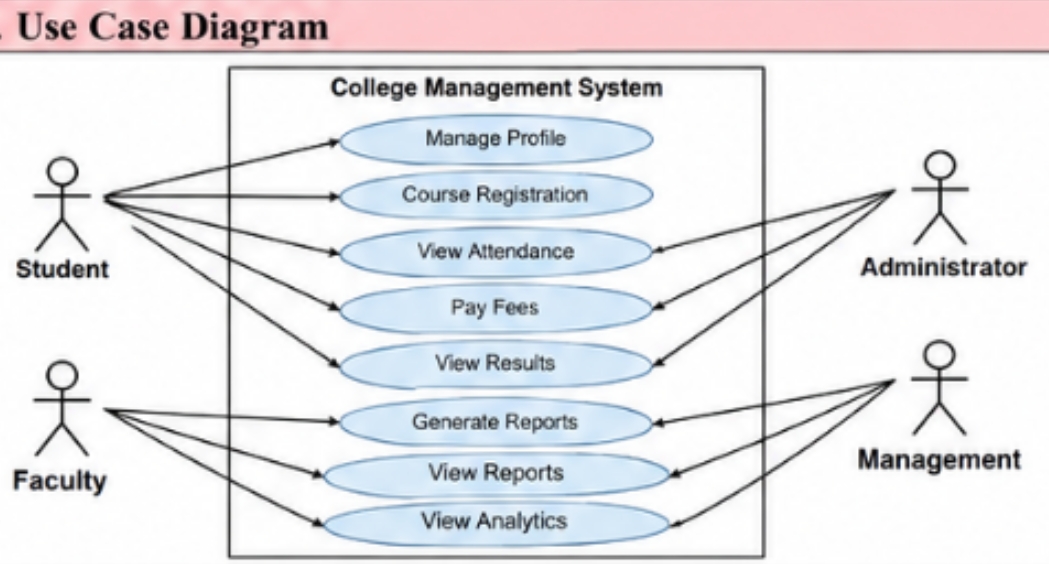
List the Major Stakeholders of a College Management System and Explain Their Roles.
Student
Uses academic and personal services such as profile management, course registration, attendance/status and academic information.
Faculty
Performs academic operations such as managing course information, attendance and academic data.
Administrator
Maintains operational records and access, including user management, master data and reports.
Management
Uses summarized information for institutional oversight through reports, dashboards and institutional information.
13
2 Marks Question
What is the Current System?
The current system refers to the existing system and its present methods of working before a new or proposed system is introduced. Fact-finding is used to understand how the current system works, its requirements and its problems.
In the College Management System case, the traditional/current environment may maintain student records, course information, attendance, academic data and administrative reports through separate registers, files or disconnected applications.
Common limitations include data redundancy and inconsistency, lack of concurrency control, lack of real-time validation, weak information security, and delayed reporting and analytics.
14
2 Marks Question
What are the Limitations of the Current System?
Data Redundancy and Inconsistency
Data may be stored in multiple files, causing duplication and inconsistent information.
Absence of Concurrency Control
Multiple users may not be able to safely access or modify data at the same time.
Lack of Real-Time Validation
Incorrect or incomplete data may be entered because validation is mainly manual.
Weak Information Security
Limited access control and audit facilities may exist.
Delayed Reporting and Analytics
Preparing reports manually takes more time.
Scalability Bottlenecks
Large amounts of data become difficult and slower to manage.
15
2 Marks Question
What is a Proposed System? State Any Two Advantages.
A proposed system is the new system designed to overcome the problems and limitations of the existing system. It generally uses computerized or automated methods and may use a database to manage information efficiently.
Centralized Data Management
Data is stored in one central database, reducing duplication and making it easier to manage.
Faster Processing
Data can be processed, searched, updated and retrieved much faster than in a manual system.
16
2 Marks Question
What is a Software Requirement Specification (SRS)?
SRS (Software Requirements Specification) is a document that describes all the requirements of a software system. It explains what the system should do and what features and functions should be included. It acts as an agreement between the client and development team.
17
2 Marks Question
What is a Data Flow in a DFD?
A Data Flow represents the movement of data from one component of a system to another. It is represented using an arrow (→), which shows the direction of data movement.
Student → Registration Details → System
18
2 Marks Question
What is a Data Store in a DFD?
A Data Store represents a place where data is stored for later use. It is usually represented by parallel/open-ended lines or an open-ended rectangle.
ExamplesStudent Database, Customer File, Employee Records.
Part Two
5 Marks Questions
Detailed, structured answers with examples, tables and diagram notes.
01
5 Marks Question
Explain the Different Levels of DFD (Level 0, Level 1 and Level 2) with a Suitable College Management System Example. Also State Important DFD Rules.
A Data Flow Diagram (DFD) is a graphical representation of how data moves through a system. It shows where data comes from, how it is processed, where it is stored, and where the processed data goes. DFDs are developed at different levels so that a large system can be understood step by step, from a general overview to detailed processes.
Level 0 DFD — Context Diagram
Provides a high-level view of the entire system. The complete system is represented as one single process, showing the external entities interacting with it and the major input/output data, without internal processes or detailed data stores.
In a College Management System, external entities include Student, Faculty, Administrator, and Management, exchanging data such as registration details, examination details, results and course information.
📌 Diagram Note: Draw the Level 0 / Context-Level DFD of the College Management System from Page 10 of Unit 2 notes.
Level 1 DFD
Breaks the single system process shown in Level 0 into its main sub-processes, and can also show the major data stores and data flows between these processes.
College Management System
     │
     ├── 1.0 Manage Student
     ├── 2.0 Manage Fees
     ├── 3.0 Manage Examination
     └── 4.0 Generate Result
📌 Diagram Note: Draw the Level 1 DFD from Page 11 of Unit 2 notes.
Level 2 DFD
Provides more detailed information about a particular process of the Level 1 DFD. Each lower level gives a more detailed view of the system.
📌 Diagram Note: Draw the Level 2 DFD from Page 12 of Unit 2 notes.
Important DFD Rules
Every process should normally have at least one input and one output.
Data should not normally move directly from an external entity to a data store without passing through a process.
Data should not normally move directly from one data store to another without a process.
Every data flow should have a meaningful name.
DFD represents data flow, not program control flow.
DFD should remain consistent between different levels.
Level 0 → Whole System
     ↓
Level 1 → Main Processes
     ↓
Level 2 → Detailed Sub-processes
Exam TipLevel 0 = Whole System → Level 1 = Main Processes → Level 2 = Detailed Sub-processes.
02
5 Marks Question
Explain Unit Testing, Integration Testing, System Testing and Acceptance Testing with Suitable Examples.
Software Testing is the process of checking software to find defects and verify that it works according to the specified requirements. The four important levels of testing are Unit Testing, Integration Testing, System Testing, and Acceptance Testing.
1. Unit Testing
Tests one small unit of a software system independently — a function, method, small module, or component. Example: testing only the Login function of a website using a username and password; the complete website is not tested.
2. Integration Testing
Checks whether two or more modules work correctly together. Example: in a College Management System, testing whether the Student Registration module correctly communicates with the Database, or whether the Shopping Cart correctly sends the order amount to the Payment System.
3. System Testing
Tests the complete software system as a whole to verify that all its major functions — Login, Student Registration, Attendance, Fees, Examination, Reports — work together correctly. The entire system, rather than an individual module, is tested.
4. Acceptance Testing
Checks whether the software satisfies the user's or customer's requirements and solves the actual problem for which it was developed. Example: college staff checking whether teachers can enter marks, students can view attendance, administrators can manage users, and whether the system meets the college's requirements.
Testing Type
What is Tested?
Example
Unit
One small unit/module
Test Login function
Integration
Interaction between modules
Registration + Database
System
Complete software
Test entire College Management System
Acceptance
Whether user/customer requirements are satisfied
College staff checks the completed system
Easy SequenceUnit → Modules working individually. Integration → Modules working together. System → Complete system. Acceptance → Customer/User requirements.
03
5 Marks Question
Explain Design Principles such as Simplicity, Modularity, Information Hiding, Reusability and Maintainability, with Examples.
Design principles are simple guidelines used to make software easy to understand, develop, test and maintain. The five important design principles are Simplicity, Modularity, Information Hiding, Reusability and Maintainability.
Simplicity
Keeping the software design simple and easy to understand, avoiding unnecessary complexity. Example: separate functions for Admission, Fees, Attendance and Examination instead of one complicated system.
Modularity
Dividing a large software system into smaller, manageable modules, each handling a particular responsibility — e.g. Admission, Fee, Attendance and Examination Modules.
Information Hiding
A module hides its internal implementation details from other modules. Example: the Fee Module only sends the Student ID and Fee Amount to the Payment Module, without knowing how it processes the transaction internally.
Reusability
Designing software components so they can be used again in other parts of the system or in other projects. Example: a single reusable Login Module used for Students, Teachers and Administrators.
Maintainability
Software should be easy to modify, fix and improve when requirements change or errors are found. Example: changing the Fee Module's calculation rules without affecting the entire system.
Principle
Meaning
Example
Simplicity
Keep design simple
Separate college functions
Modularity
Divide system into modules
Admission, Fees, Attendance
Info Hiding
Hide internal implementation
Payment module hides its processing
Reusability
Use components again
Common Login Module
Maintainability
Easy to modify and fix
Change Fee Module without affecting the whole system
In ShortGood software design should be simple, modular, secure in its internal details, reusable and easy to maintain.
04
5 Marks Question
Explain Common Testing Issues, Security Issues and Limitations of a Proposed System.
A software system may face various testing problems, security risks, and limitations during development and after implementation, described here in the context of a proposed College Management System.
1. Common Testing Issues
Unclear Requirements
If requirements are not clearly defined, it becomes difficult to decide what should be tested — e.g. "The system should be fast" is unclear about the exact time limit.
Testing Every Input is Impossible
There can be a very large number of possible inputs, so testers select important test cases rather than testing every combination.
Limited Time
Developers may have limited time before release, so it may not be possible to test every feature completely.
Different Environments
Software may behave differently across browsers, mobile phones, operating systems and screen sizes.
Regression Problems
A new change may accidentally break an older feature that was previously working correctly.
2. Security Issues
Security means protecting the system and its data from unauthorized access, misuse or unwanted changes.
Authentication
Verifies who the user is — e.g. username/password, OTP, fingerprint or face recognition.
Authorization
Determines what an authenticated user is allowed to do — a student should not be allowed to modify examination marks.
Input Validation
User input should be validated to prevent invalid or malicious data — e.g. an age field accepting only values between 18 and 60.
Data Protection
Sensitive information such as student records, passwords and financial information must be protected from unauthorized access or modification.
Access Control
Only authorized users should access restricted functions — students view their own marks, teachers update marks, administrators manage users.
3. Limitations of the Proposed System
Internet Required
If the system is online-only, it may not work when there is no Internet connection.
Limited Users/Departments
The system may initially support only certain departments.
Advanced Reports Not Available
The system may provide basic reports but not advanced analytics.
Limited Scalability
It may work for a limited number of users but may not yet be designed or tested for a very large number of users.
Manual Work Still Required
Some activities may remain manual, such as certificate generation.
Explain the College Management System Case Study with Reference to its Scope, Functional Requirements, Non-Functional Requirements, Stakeholders, Security Issues and Future Enhancements.
The College Management System (CMS) is a centralized software application designed to support the academic and administrative activities of a college, replacing separate registers, files or disconnected applications with a structured system where authorized users access information according to their roles.
1. Scope of the Proposed System
Student and user profile management
Course and academic information management
Student course registration and eligibility validation
Attendance and academic record management
Administrative management of users and system data
Generation of operational and management reports
2. Functional Requirements
Functional requirements describe what the system should do.
Authentication and Authorization
Users should be able to sign in and access functions according to their roles.
Student Profile
Maintain student profile information and allow authorized updates.
Course Management
Maintain course information and make relevant course data available.
Course Registration
Support course selection, eligibility checking and registration confirmation.
Attendance
Authorized faculty can record and maintain attendance.
Academic Data
Authorized users can maintain relevant academic information.
Reporting
Generate useful reports for authorized administrative and management users.
3. Non-Functional Requirements
Non-functional requirements describe how well the system should perform.
Usability
Interfaces should be understandable to students, faculty, administrators and management.
Performance
Login, record retrieval and report generation should respond within acceptable time.
Security
Student and academic information should be accessible only to authorized users.
Reliability
Stored information should remain consistent and recoverable after failures.
Maintainability
Modules should be organized so that future changes can be implemented with limited impact.
4. Major Stakeholders and Their Roles
Stakeholder
Role
Student
Uses academic and personal services such as profile, courses, registration, attendance and academic information.
Faculty
Performs academic operations, including course information, attendance and academic data entry/update.
Administrator
Maintains users, master data, operational records and reports.
Management
Uses reports, dashboards and institutional information for oversight.
5. Security Issues
The CMS handles sensitive student and academic information, so the following security measures are important:
Authentication
Protect user accounts from unauthorized access.
Authorization
Ensure users can perform only operations appropriate to their roles.
Data Protection
Protect sensitive student and academic information from unauthorized disclosure.
Input Validation
Reduce the possibility of invalid or malicious input reaching application logic.
Audit Information
Maintain audit information for important administrative operations.
Backup and Recovery
Plan backups and recovery procedures for critical records.
6. Future Enhancements
Mobile-friendly access for students and faculty.
Integration with examination, library, fee and other institutional systems.
Advanced dashboards and analytics for management decision-making.
Notification services for important academic or administrative events.
Improved accessibility and multilingual support according to institutional requirements.